Data widget
Data widget is a CoSApp Lab widget allowing users to visualize variable data inside ports of CosApp system. Users can use data widget in notebook as a JupyterLab widget or use it in SysExplorer.
Start data widget
To open DataWidget inside SysExplorer, just select Data widget in widget menu of any section.
To use DataWidget as a JupyterLab widget, users can import it from cosapp_lab.widgets, the required input parameter is an instance of CosApp system. In default mode, DataWidget will be opened on a side panel of JupyterLab interface, to modify the position of widget, user can user anchor keyword as SysExplorer widget.
from cosapp_lab.widgets import DataWidget
demo = AnyCosappSystem("demo")
a = DataWidget(demo, anchor = "tab-after")
Data widget main interface
DataWidget contains a table to display variable data and a toolbar at the bottom. Each variables is shown in a expandable row, user can click on expand button to get the detailed information. If a variable goes outside its limit or validity range, user will be warned by line color (yellow or red).
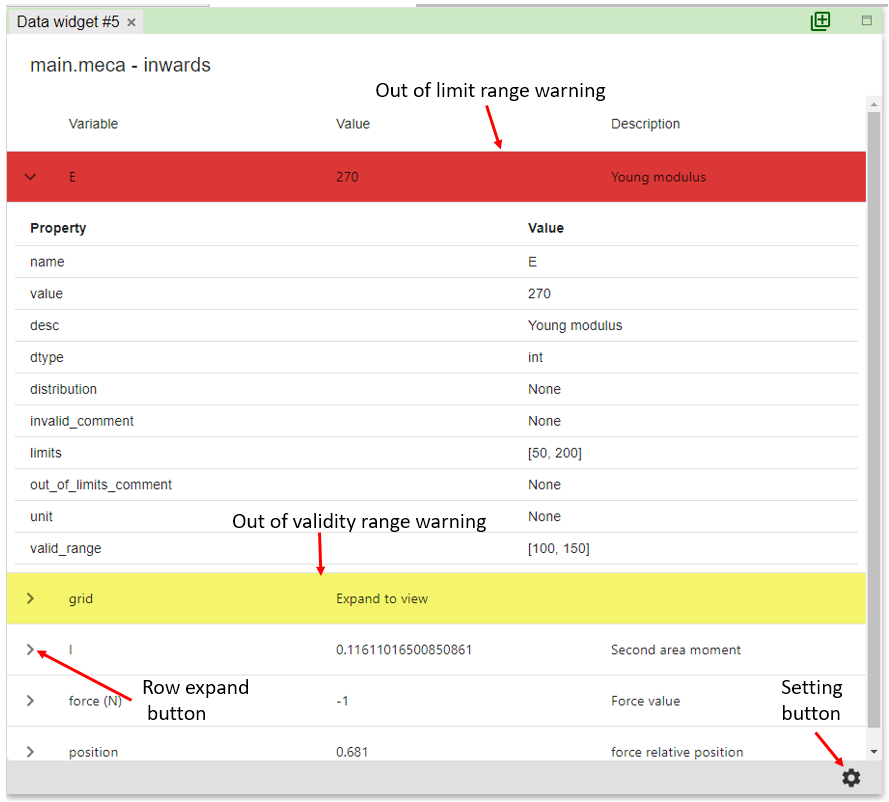
The toolbar in the bottom of interface contains the button to open setting dialog
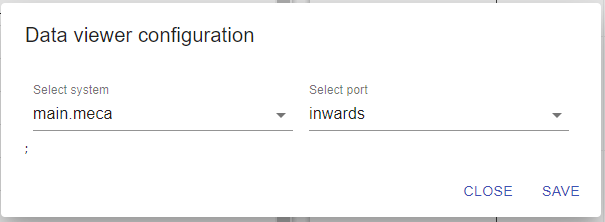
Widget setting dialog
This dialog is used to select port to display in widget, user can select one port or all ports.