
Controller widget
Controller widget is a CoSApp Lab widget allowing users modify the value of variables and then re-run system with new parameters. Users can use controller widget in notebook as a JupyterLab widget or use it in SysExplorer.
Start controller widget
To open ControllerWidget inside SysExplorer, just select Controller widget in widget menu of any section.
to use ControllerWidget as a JupyterLab widget, users can import it from cosapp_lab.widgets, the required input parameter is an instance of CosApp system. In default mode, ControllerWidget will be opened on a side panel of JupyterLab interface, to modify the position of widget, user can user anchor keyword as SysExplorer widget.
from cosapp_lab.widgets import ControllerWidget
demo = AnyCosappSystem("demo")
a = ControllerWidget(demo, anchor = "tab-after")
To open ControllerWidget inside SysExplorer, just select Controller widget in widget menu of any section.
Controller widget main interface
ControllerWidget contains a table to display variable input and a log window at the bottom. Unlike the other widgets, all the controller widgets are synchronized so user should only use one controller widget.
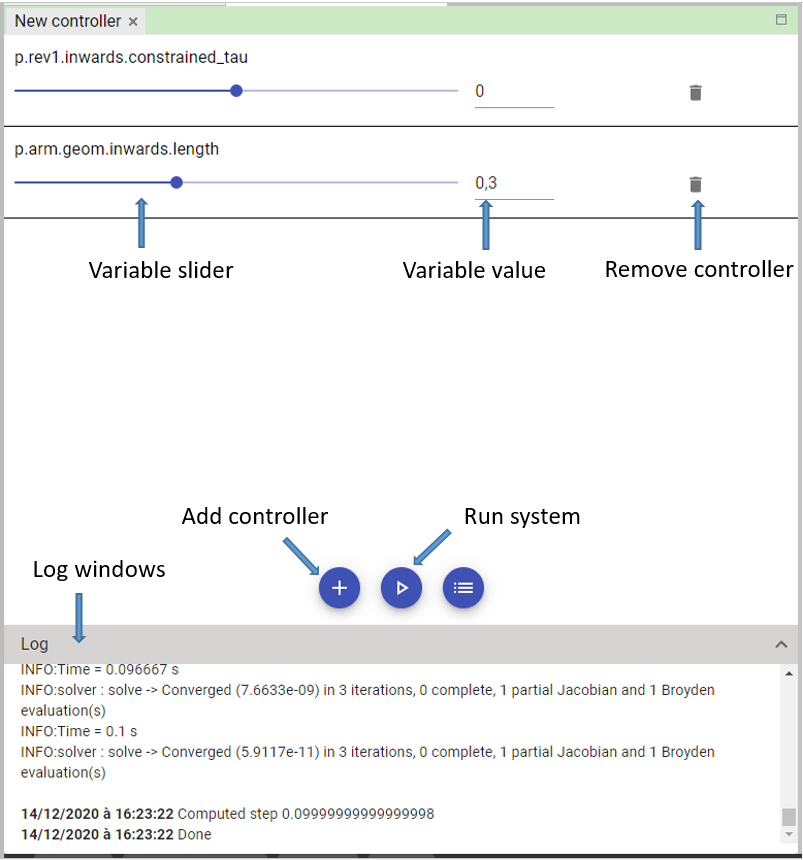
Add controller button: This button is used to open the add controller dialog.
Run system button: This button is used to re-run system with new variable values.
Log window: The dialog to show the progress of running driver.
